Games like MouseMob – Keyboard & Mouse Automation
Customize your PC control with MouseMob! Manage mouse clicks, keyboard presses, window events, and more with on-screen regions. Create Chains to automate complex tasks with a single key. It's a productivity and accessibility tool.

Players who liked MouseMob – Keyboard & Mouse Automation also play
Ranked by collaborative filtering across millions of Steam libraries plus content overlap on genres, tags, and developers.
- 1

CPUCores :: Maximize Your FPS
Maximize your FPS :: Use CPUCores to isolate and constrain OS + non-game processes and dedicate CPU resources to be used exclusively for your games! CPUCores fully integrates with all Steam games!
- 2

ClearMem :: Free Up Your RAM
ClearMem is a cutting-edge application that does 1 thing: Clears your RAM. You simply run the application and watch your RAM consumption drop considerably! ClearMem fully integrates with all Steam games as well as non-Steam games and applications!
- 3
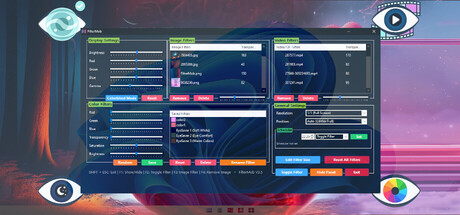
FilterMob – Screen Filter for Gaming, Work & Eye Strain
Transform your screen with FilterMob! Perfect for eye protection, gaming/work atmosphere, and accessibility. Easily apply color, image or video filters. Customize RGB, Saturation, Brightness, and Transparency in real time. Save Profiles and Schedule.
- 4

Gaming Copilot: AI Companion
Your AI gaming buddy! Get precise strategies fast. Powered by smart AI and game databases, it gives instant voice help and smart screenshot analysis. Plus, handy tools like real-time translation and borderless controls. And yes, it cracks jokes too! Level up your gameplay with Copilot for a blast!
- 5

- 6

YoloMouse - Cursor Changer
Make your game or app cursor stylish and always visible. Replace, resize, recolor, and enhance with effects and animated styles. Create and share via Steam Workshop.
- 7

Beam Eye Tracker
Enjoy more immersion in hundreds of PC games. Works with your webcam or phone, no extra hardware needed. Free demo.
- 8

Bot Studio for Discord
The easiest way to make Discord bots. A drag and drop editor makes it simple to create the perfect bot for your servers, no coding required!
Cheaper alternatives
Games in the same vein priced at least 40% below MouseMob – Keyboard & Mouse Automation at current Steam store prices.
- 1
FilterMob – Screen Filter for Gaming, Work & Eye Strain
Transform your screen with FilterMob! Perfect for eye protection, gaming/work atmosphere, and accessibility. Easily apply color, image or video filters. Customize RGB, Saturation, Brightness, and Transparency in real time. Save Profiles and Schedule.
- 2
Gaming Copilot: AI Companion
Your AI gaming buddy! Get precise strategies fast. Powered by smart AI and game databases, it gives instant voice help and smart screenshot analysis. Plus, handy tools like real-time translation and borderless controls. And yes, it cracks jokes too! Level up your gameplay with Copilot for a blast!
- 3
YoloMouse - Cursor Changer
Make your game or app cursor stylish and always visible. Replace, resize, recolor, and enhance with effects and animated styles. Create and share via Steam Workshop.
Frequently asked about MouseMob – Keyboard & Mouse Automation
- How much does MouseMob – Keyboard & Mouse Automation cost?
- MouseMob – Keyboard & Mouse Automation is listed on Steam at 9.99 USD (current store price; Steam sales may reduce this temporarily).
- What games are most similar to MouseMob – Keyboard & Mouse Automation?
- Based on Steam play patterns and shared genres/tags, the games most often recommended alongside MouseMob – Keyboard & Mouse Automation are CPUCores :: Maximize Your FPS, ClearMem :: Free Up Your RAM, FilterMob – Screen Filter for Gaming, Work & Eye Strain.
- Who developed MouseMob – Keyboard & Mouse Automation?
- MouseMob – Keyboard & Mouse Automation was developed by istenen.
imho.run ranks Steam game alternatives using a mix of collaborative filtering (ALS / iALS / EASE / LightGCN), content scoring over genres, categories, Steam tags, developers, and publishers, plus AI-extracted vibes mined from review text. The page above is generated in seed mode anchored on MouseMob – Keyboard & Mouse Automation.
For library-aware picks tuned to your specific taste, sign in with Steam on the home page.